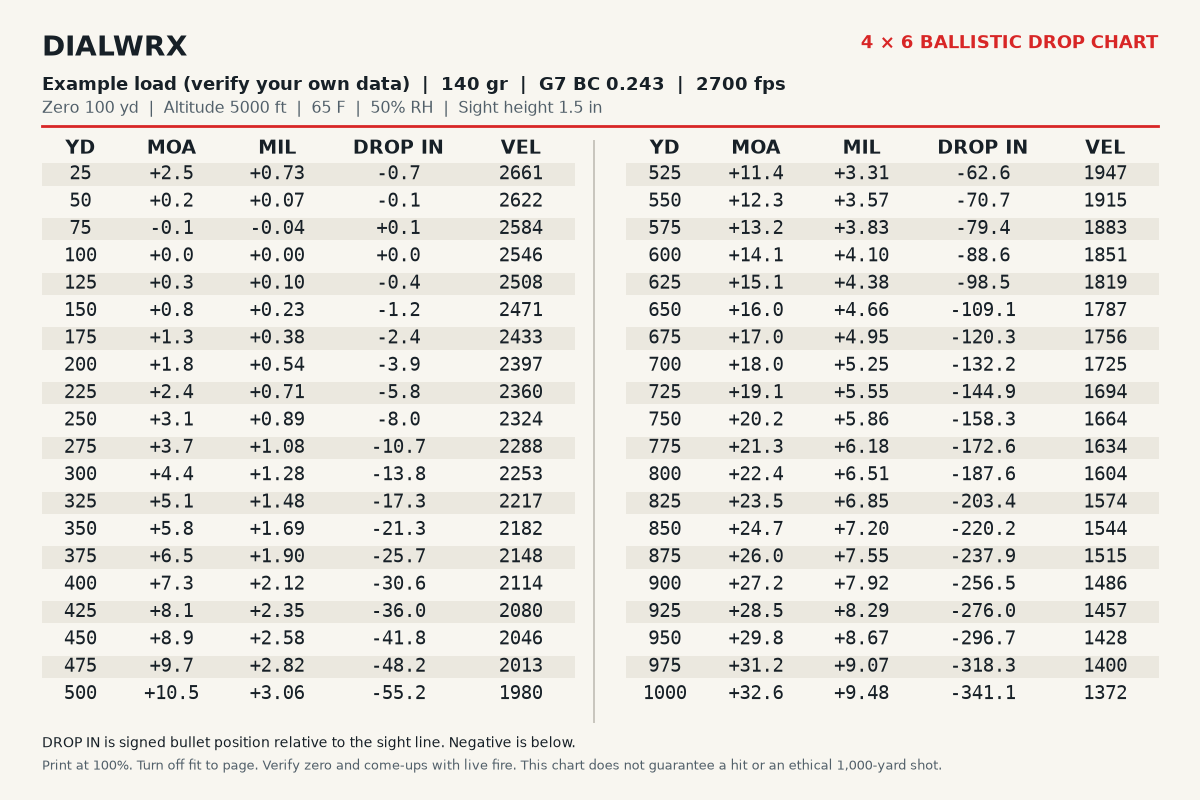
Read the card
Each row shows range in yards, elevation come-up in MOA and MIL, remaining velocity in feet per second, and signed drop in inches. Negative drop is below the sight line. Positive drop is above it.
Match the elevation unit to your scope. Use the MOA column with an MOA turret, or MIL with a MIL turret. The chart gives an angular correction, not the number of clicks on every scope.
Preview, email, print
Enter your load to preview the card. You can also read every calculated row in the accessible table below the preview. When you want the PDF, enter an email address and request delivery.
The PDF is a true 4×6-inch landscape card. Print at 100% scale with fit-to-page turned off. You can print it on larger paper and trim it to size, or keep the PDF on your phone.
The delivery email offers a separate confirmation for occasional DialWRX updates. Requesting the chart does not subscribe you. See the privacy policy for details.
Confirm it on paper first
Check the zero and compare calculated come-ups with live fire at known distances under representative conditions. A chart through 1,000 yards is not a recommendation to shoot or hunt at that distance, and it does not guarantee a hit.
Put the same load on your turret
After generating the chart, choose Build Your Tape to carry the projectile, velocity, zero, and altitude into the tape builder. Check your actual sight height and conditions there, then enter the turret measurements. The chart and tape can differ if you change those inputs.
The tape's free fit-and-style preview uses demo yardage marks. One purchased custom setup is $18 and includes a print-ready PDF with 10 matching cutout tapes using your ballistic inputs. No physical tapes are shipped.
Read the turret tape setup guide or browse all free tools.